Showing posts with label 2D art. Show all posts

Wednesday, March 9, 2016

Angela Buchanan, Week 9 PPJ, Blog Post 9, GMAP 378

2D art, interface, texturing

I focused on refining the interface more this week. This included cleaning up instructions, adding missing elements, and reflecting any changes.

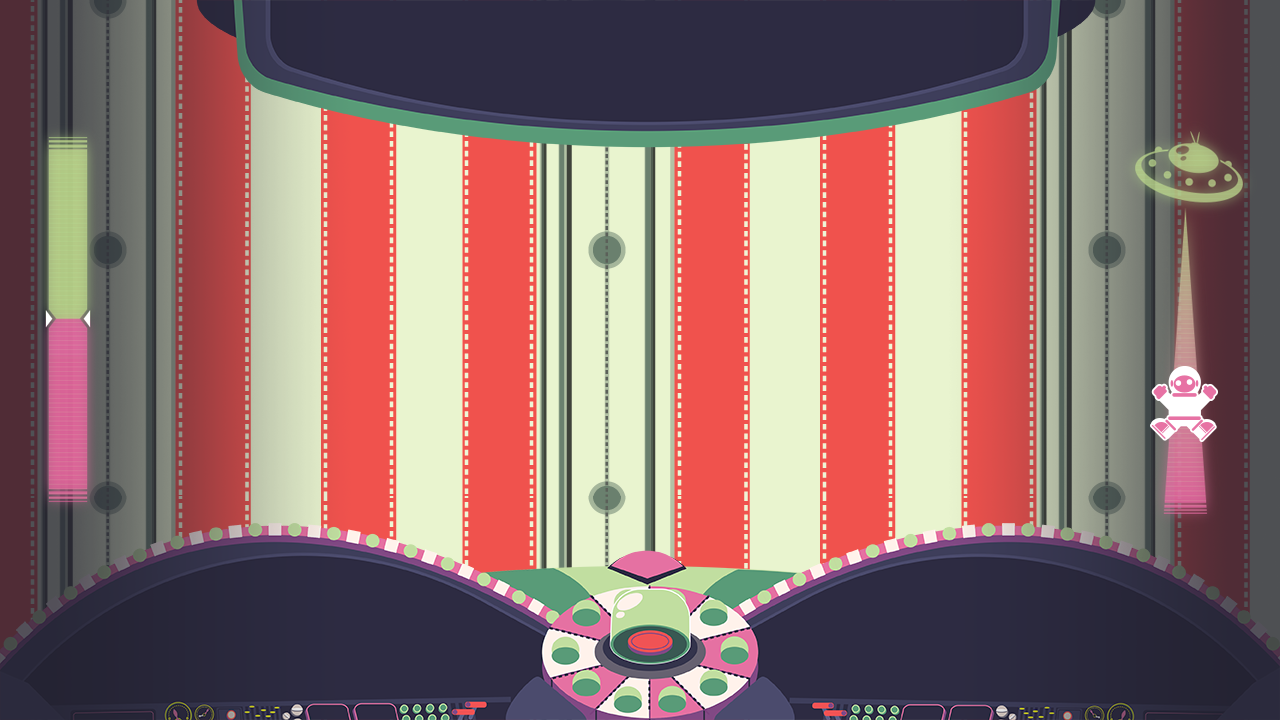
A big challenge for me this week was finding a way to the score and timer bar stand out. I tried a few different methods until I decided to try adding gradients to the sides. While it was a very simply solution, I felt it worked most effectively. My other methods seemed too bulky and thick compared the smooth gradient. Additionally, the gradients can be placed on-top of the dash as well, making the dash environment look less flat.

I also made some art to fill the blank space on the slot machine. Originally, before the aliens had their own console, that space was going to be used for slot instructions. Now it's just for decorative purposes.

Positive Content   
-  I don't expect to have to any more tweaking unless absolutely necessary.
- Found a nice, simple solution to make the time and score bar stand out more 

Negative Content
- Didn't work as much on the sell as I would have liked to


Work and hours

Instruction screen update (1 hrs)
Just a general update to fix changed instructions, add any missing ones, and fix any errors in previous ones.

Time and score bar visability fix (1 hrs)

My first method used a faded pixelated shadow effect, but I felt this looked to clunky and clashed with other interface elements.

The gradient also adds a stronger sense of space to the dash, so I decided to stick with that solution.


Slot screen art (.5 hrs)


The process for this went smoothly.I looked at some slot machines for minor influences, aside from that it was a simple asset to make.

Sell Tweaking (.5 hr)

I tweaked the sell as much as could with the amount of time I had remaining. I expect to do more next week, but the game tweaks had a higher priority.


Total Hours: 3 hrs

Post Mortem

Things that went right

- Overcame interface design challenges (Making things visual and quicker to understand)

Working on the interface was my biggest task for this project. The game heavily relied on players being able to quickly pick up and adapt to the instructions. At the same time, we wanted players to clearly know their progress.

This was challenging due to the chaotic nature of our game. With so much going on, good design is important to make the interface stand out. I knew without a good interface, the game would not be playable.

Taking feedback and using some of my own ideas, I felt I was able to establish a strong interface that has made significant developments throughout the term. Aside from some text instruction, the majority of our interface is visual, making it easy for the player to quickly grasp information.

- Managing more people

Communication is my weakness, regardless I felt I was able to communication more effectively this term with both the programmers and the artists. I managed to keep relatively up-to-date with instruction changes through the term and during meetings I encouraged the programmers to voice any needs or requirements for particular assets. 

As for the artists, I provided feedback when possible and helped direct some design decisions.
When asked for advice, I responded quickly.

Additionally I made it clear where all assets could be found and included direct file paths to assets during my updates.

- Produced a lot of work

The interface alone required a lot of components, updates, and changes. Along with that there was the slot machine (Another big project of mine) and the icons. Both tasks required a lot of attention and updates and took the majority of my time.

Despite this, I still managed to complete other tasks. Generally texturing, but I also took care of some basic modeling.


Things that went wrong

- Miscommunication and organization (Lack of firm leadership skills)

I prefer to have heavy influence over projects I work on, therefore I tend to lean towards leadership roles when possible. However, I struggle with effective communication and organization (The state of my desktop folders and desk support this fact),

I do feel that this negatively impacts the project.I did take initiative and attempted to prompt discussion on the art side of things, but the clarity of my words and lack of firm voice does not draw much attention.

Additionally, I felt folders could have been better organized and I could have contributed more documentation that set down a specific workflow for artists. I plan on relying more on reference documents like this for future projects to help add direction where my voice cannot.

- Insufficient planning early on (Game concept art)

I have mixed feelings when it comes to concept art. At the beginning of the project it contributed a lot to setting the mood, however many ideas expressed in concept did not make it's way into the game. Concept art also requires a lot of work, which takes time away from asset production.

During this term, there was game-flow concepts, which I ended up not assigning further as I felt they were not useful. I felt there was a strong disconnect concept and what was actually produced (alternatively, I felt there was also disconnects from ideas stated and concept produced).

Instead, I stuck to a reactive approach for assigning tasks. However, I felt I still should have set some side time aside to plan out and predict art assets ahead of time. I did some this, but not to the extent that I should have.

- Difficulties distributing work

This is partially due to the insufficient planning and organization, but I had difficulties assigning tasks.
Better communication while game were being built would have allowed me to create a stronger asset list that could've been in place sooner.

Additionally, the skill and style differences of artists made it hard for me to make decisions regarding task distribution.

Honestly, I'm still lost on how to effectively manage skill and style differences of artists. When you're working with deadlines, it's hard to make decisions for when assets need to be redone. Especially when those assets take a lot of time.

Wednesday, March 2, 2016

Angela Buchanan, Week 8 PPJ, Blog Post 8, GMAP 378

2D art, interface, texturing

This week has been about refining assets and updating the interface to make it easier to understand or to reflect changes.

My big focus for the week was placed on updating the human instructions to add icons to their dash.This can act as an additional visual aid to let the humans know that the bottom instructions belong to them.

I added a gradient to the UFO to also help the humans feel more threatened when their spaceman approaches the enemy color.
The spaceman itself has an animation to allow him to look more panicked.


Positive Content   
-  Human players are represented by icons instead of number now
- UFO time bar implemented the green/pink seperation
- Human animation will add more panic to the time bar

Negative Content
- Finals are approaching. This will affect work for the remaining weeks.


Work and hours

Human Instruction screen update (1.5 hrs)
Instead of using P1 and P2, the players are now represented with a human icon with a number on his head. Visually, this is more interesting and will aid the player in knowing that these are human instructions.
.


Time Bar Update (1 hrs)

UFO now now has a gradient. As the space man moves up he will approach the green. Because green is the color of the enemy for the humans, they will see this is a bad thing. 

The space man has a "panic" animation now as well, to better convey the feeling of urgency.

Instructions Update (.5 hrs)

Just a general update on instructions that were needed for new games. 

Alien Gets Emotional (.5 hr)

The alien has emotions to help convey when he has been hit or is about to perform an action.
Also makes the character more interesting.


Icon Update (.5 hrs)

Icons for a couple of new games. One is for a dance game and the other is for a crazy ball variant game. 


Total Hours: 4 hrs

GDC Vault - Designing Without a Pitch: FTL Post-mortem 

I chose to watch postmortem of an independent game for as a student, I find them more relatable to my own projects. FTL’s post-mortem was especially relatable as they chose to jump straight into the construction of the game without having a clear end goal in mind.

I felt this is a common approach for student projects, so it was interesting to see how Justin Ma and Matthew Davis managed their workflow and design process to find their way to their end product. They didn’t intend for FTL to be full-effort project, therefor I felt this was a good way to start for them. They note during the presentation that the project was harder than what they had anticipated, and I feel that their lack of initial planning may be to blame.

Alternatively, I felt this method of design also benefited the development of FTL. Because they had a loose image of what they wanted, they were more prone to experimenting and attempting alternative mechanics and features.

However, once they launched their kick starter and they had expectations to fulfill, it became more important for them to decide on an end state. During their kick starter they wasted time trying to get features to work that were not necessary, out of scope, or did not fit well with the design with the game. After they were faced with feature creep, they knew that they needed to solidify their ideas.

Overall I felt they handled the project well, especially considering they did not intend for it to be a commercial product. Personally, I value having a well-established vision before diving straight into a project, but this isn’t always possible when given time restraints. I feel some of the lessons learned through FTL’s post-mortem can be applied to my own projects.


Wednesday, February 17, 2016

Angela Buchanan, Week 6 PPJ, Blog Post 6, GMAP 378

Interface, 2D art
After feedback from last class, I shifted my primary focus to the UFO interface. We needed a better way to get the alien instructions across more clearly and quickly. 

Since the humans have their screens split at the bottom, I decided to give the aliens their own designated screen centered at the top. I have minor concerns regarding the screen space taken up by the aliens screens, so it may have to be slimmed down. This will be a decision made during our next group meeting.  

Additionally, I spent some time getting all the instructions up to date as well as the slot machine icons.
Aside from 1 or 2 games, everything is up to date now.

Overall the week was productive, but not as productive as I had intended. A different class demanded more attention than this one and that assignment took more time than I had anticipated.

Positive Content   
- Aliens now have their own screen and set of instructions
- Game instructions are currently up to date
- All dash instructions are now designed to be 100% aligned.


Negative Content
- Didn't get everything planned done.
- Alien dash may take up too much screen space.

Work and hours

Alien Dash Update (2 hrs)

The top center of the screen seemed like a good place to store alien instructions, since the humans don't have to pay much attention to the top of their screen.

Since the alien instructions will always be in the same place, they will now quickly know what to do and how to do it. 

I also kept the design simple so that the humans would not be overly distracted.


Alien Instructions (4 hrs)

I had to set up the basic framework for the alien instructions (buttons/icons)
Now that one is in place, it should be very easy to update the instructions as needed.

Like the human instructions, they are designed to align perfectly when placed at the same spot on the screen.


Alien Model Texture (.5 hrs)

Originally, I was going to focus more on this. But I decided other tasks had a higher priority. 
However, I still spent some time making sure the UVs are going to work the way I want them to so that I can address any potential problems during our next group meeting.

Icon + Human Instructions Update (3 hrs)

I decided that aligning the human instructions was high priority task, so I completed that as soon as possible. 

Additionally, I added instructions for the games that needed them.

I also made sure that the slot machine had all the icons for all current games.


Total Hours: 9.5 hrs 

Wednesday, February 10, 2016

Angela Buchanan, Week 5 PPJ, Blog Post 5, GMAP 378

Texturing, Concept art, GDC Preperation
I new this week would be busy for me and that I would not be able to get much done. Therefore I took up easier tasks that I knew I would be able to handle. 

One of the artists requested that I make an orthographic to make it easier for them to make a model, so I put most of my time into that.
Additionally, the mech game needed color codes for the targets that are being shot so that the two players know who should be shooting what.

Positive Content   
- Orthographics if a alien is useful for concept purposes and modeling 
- Mech game got a much needed texture update
- GDC selection competition was stressful, but fun.


Negative Content
- GDC selection competition took more of my time than expected.
- Week was busy, other classes and tasks had a higher priority.

Work and hours

Alien Orthographic (2 hrs)

I didn't want the models for this guy to be overly complicated, so I kept the orthographic simple.
I didn't include the back, for it was not necessary. 


Mech War Texture update (3 hrs)

It took me a bit to decide the best way to go about doing this. Right now the colors represent the shades of lipstick (as already seen in-game).
I'm hopeing the two colors are different enough for the player to distinguish in-game, but that will be determined through playtesting.. 


GDC Preparation (4 hrs)

Mostly focused on polishing the presentation, getting/interviewing play-testers for footage, and rehearsal.

Total Hours: 9 hrs 

Wednesday, January 27, 2016

Angela Buchanan, Week 3 PPJ, Blog Post 3, GMAP 378

Interface, 3D art, 2D art, 2D animations
I was able to mostly complete the slot machine this week, however, I didn't realize unity didn't have an easy way to implement masking. Therefore, some minor adjustments will need to be made to the base so that icon can fully scroll downward before disappearing. 

Unfortunately I had the animation frames done before knowing this, so I will have to go back and modify the slot and update the frames.

When creating the sprite sheets for the slot machine, I was faced with minor set backs when trying to get the sheets to work properly in unity. The animations kept coming out shaky and not smooth.
Eventually I resolved the problem when I realized my dimensions were not in powers of two.
Fixing the dimensions seemed to fix the problem.

I did my best to update as many of the dash instructions as I could, but eventually I ran out of time and had to focus on other assignments for other classes.


Positive Content   
- Managed to get the slot machine sprite sheet working
- Fixes needed for the slot machine will be easy to implement

Negative Content
- Slot machine will require some minor edits for it to be usable
- Struggles with animations held me back a bit


Work and hours

Slot Machine and Animations (4 hr)

- Right now the bottom is too thin for icon to pass by without disappearing awkwardly, so I'll have to adjust the base. Other than that, the slot machine is complete.
- The screen above the slots are intentionally left blank to allow different messages to be displayed.


Cardboard Cutouts (1.5 hr)

- Just a simple collection of cardboard cutouts for use in the water-gun game.
- The UFO is the goal for both alien and humans while the spaceman and alien are the rising characters


Interface Update (.5 hr) 

- The modifications are simple, so they do not take very long. I toyed around with slanting and distorting the text, but all versions seemed off in comparison to the original. 
- Because of that, nothing much has changed other than size and minor reposistioning

Total Hours: 6 hrs