Showing posts with label Perforce. Show all posts

Wednesday, January 13, 2016

Xavier Smith, Week 1 Journal PPJ, Blog post 1, GMAP 378


Idea creation, Master Asset/Task List, Team Setup, Slack, Perforce, Team Integration, PPJ

Content with Hours (Examples included):
           Today's the week we merge teams and expand! A lot of the work this week was focused on getting all the new members into our team and setting the structure for our project moving forward. I spent some time ascertaining team member's strengths/weaknesses and delegating work and positions within the team accordingly and established small tasks for everyone to accomplish by our next meeting that I set for Sunday. Here's to hoping things run smoothly all term
(1.5 hrs)

              Our first meeting! They grow up so fast. This week I gave the new programmers a basic overview of the system and assigned them the task of creating a very basic mini-game so that they could get a feel for the system we've implemented moving forward. I then sat in on the artist's meeting where we discussed game concepts, mockups, and storyboards.
(2 hrs)
  My second task was starting on the Master Asset List. I looked at all the games we had planned from the weekly meeting and created programming assets accordingly. I also made note of all the documentation we'd need to do and when we'd need it by. 
(1 hrs)


Content Positive (Duplicate hours from above):
-          Group organization tools are setup and everyone has a good idea of what's expected (1 .5 hrs)
-          We pitched a ton of games and concepts in our meeting. Everyone got a chance to speak and contribute something! (2 hrs)
-          Finished everything but the art for the Master Asset and Task List, so we have a ballpark estimate of how much we need to get done this term  (1 hrs)
Content Negative
-          Some members couldn't make the meeting, but they Skyped in and were informed of everything.

Total Hours for the week: 4.5 hrs


Tuesday, January 12, 2016

Ryan Crim, Week 1 Journal PPJ, Blog post 1, GMAP 378


Content with Hours (Examples included):

After meeting as a whole team at the end of the first class, I took a little bit of time to read over the GDD and familiarize myself with the layout of the Perforce and Slack channels. (0.25 hr)

Having a better understanding of the game and process, I tried to brainstorm some rough game ideas as well as quickly look into some implementation ideas. One of these ideas involved creating a tilting platform with a maze (see idea 2), which was not too difficult to implement thanks to this helpful link (http://catlikecoding.com/unity/tutorials/maze/). However, there were a lot of early collision issues that would need to be worked through to make this idea solid. My rough implementation for High Strikers (idea 1), went a little better, but there are also cases where the hammer collides a bit weird with its surroundings as well. Below are short descriptions of each of the rough game ideas I had. (1.75 hrs)
  1. Throughout the arena, there are High Strikers (strength machines to hit with hammer) that the humans must go around and trigger to show their strength. The first player walks around while the second player controls the hammer. The aliens could modify the position of the High Striker machines or disorient the playing field in some way. Furthermore, if it were decided to have actual micro-games, then the idea of moving around could be eliminated and the players each control an axis of the hammer to hit one High Striker before time runs out.
    Figure 1. Screenshot of rough High Striker game

  2. The humans are placed inside of a maze on a tilting platform. By tilting the platform, the humans slide their way through the maze trying to get to the end goal that is placed on the opposite side of the maze. Meanwhile, the alien abilities could include swapping between two mazes every so often to try to throw off the humans rotating the platform to change the controls.
    Figure 2. Screenshots of rough maze game switching between mazes

  3. The humans need to get through all of the crowds to make it to their favorite ride, in the style of Frogger. One player is in control of moving, while the other is in charge of rotating the view to see where incoming obstacles are. The aliens can slightly disorient the humans to slow their progress. 
  4. The humans are in charge of a face painting booth, so they are given a stencil to fly above and try to match with paint. The first human controls the flight while the second controls when the paint flows out. The aliens affect the “person” being painted, such as having them sneeze, etc. to try to mess up the paint job. 

Furthermore, on this past Sunday, we had our first group meeting that I tried to remote into since it is not an easy task for me to make it down to Drexel on the weekend. I was able to connect into the Skype call with John and Xavi, however, there were connection issues that caused all of the voices coming through to sound extremely robot-y and not understandable at all until eventually the call dropped. (0.25 hr)

One note I did get from the meeting was that the programmers were tasked with implementing a scene to show the correct handling of the TransformWrapper as well as score and timer updating, so I took my High Striker scene and added it to the project to show that I could implement those features (see Figure 1 above). In general, the process of adding a mini-game to the system was not difficult, but there was a tad bit of confusion with how some features of the structure work. (0.50 hr)

Content Positive:
- Gained an understanding of how to add a mini-game with a timer and score
- Brainstormed and roughed out a few very basic games ideas

Content Negative:
- Remoting into the first meeting did not work, therefore I missed most of the discussion

Total Hours for the week: 2.75 hrs

David Monteleone, Week 1 Journal PPJ, Blog post 1, GMAP 378

Idea creation, Team Pipeline, Team Setup, GDD, Slack, Perforce, Team Integration, PPJ

Content with Hours (Examples included):
This is the start of our new expanded team! Now that we have the other half of the class with us, I had to integrate them into our current system. I had to get everyone into our Slack and explain what each channel is used for and how we use Slack. I sent out the initial set of invites to edit our blog. Somehow this was a bit of a problem and so many people needed some instruction on how to use the blog. Both Cory and I assisted in this area. I had to get everyone setup on our Google Drive so that they can edit the weekly Status Report file that we use. I also handed off the leadership of the group to Xavier. I feel that I learned plenty from being the main leader last quarter and it’s time for someone else to gain the same experience. I let him know my concerns and explained how I’ll help him along the way if any issues do come with regards to team organization and leadership. Last, I helped anyone that needed to get up to date with using Perforce as we needed to put a file into Perforce this week.
(1 hr)

My main task for the week was to put together the Team Pipeline Doc. This doc contains the necessary information about how to get started with our group, how the leadership is structured, how mini games will be made and implemented, and plenty of other important group information. This document was constructed from some of the content in last quarter’s GDD, but it was looked over and refreshed to better reflect how the group wants to run this term. I had to gather the necessary version numbers of all the tools we want to use this term. I also created a pipeline, with steps, to formulate mini games, build them, and ultimately integrate them into the main game. Last, I created the group hierarchy from the agreements we came to in class.
(2 hrs)

                I also attended our first entire group meeting. At this meeting I participated in formulating ideas that can be made into future mini games. I acted as the voice of reason as I was a main designer and programmer for Alien Arcade last term and understand most of its limitations. There was also a programmer meeting at this group meeting where both Xavier and I explained to the new programmers how the code is structured and how games integrate into the system as a whole.
(1 hr)

                Last, I went ahead and made a grey box idea for the water gun game that we came up with at our meeting. This is simply a proof of concept. The great part of doing this was that it showed myself how easily we can reuse assets from our other mini games. I reused scripts from the mech game and several others to create the grey box shown below. Shooting the red targets will move them upwards. In the future we want to expand on this to possibly a race between the humans and the aliens. The grey box is made, but not integrated into the entire game.


 (2 hrs)

Content Positive (Duplicate hours from above):
-          Group organization tools are setup by myself and ready to go! (1 hr)
-          The Team Pipeline Doc is complete and gives the group a go to document for team organization and how to integrate new games into Alien Arcade. I created this. (2 hrs)
-          Our first group meeting was an excellent start to getting the group’s mini game ideas flowing. (1 hr)
-          A grey box for a water gun game was made by myself. (2 hrs)

Content Negative
-          None

Total Hours for the week: 6 hrs

Tags: Idea creation, Team Pipeline, Team Setup, GDD, Slack, Perforce, Team Integration, PPJ


Thursday, October 29, 2015

Cory Zicolella, Week 6 PPJ - Blog Post 3

Modeling Mech Legs v2 - 2 hrs
Sell Update - 1 hrs

Admittingly, I didn't do much this week due mainly to problems I ran into with the University itself, taking much of my time.  That being said, I got the mech legs reasonably more done (adding actual feet to the model) and updated the sell pitch so it has much less filler, and is less wordy/more to the point overall.
At some point soon I'll be updating our team logo ideas, doing some color sampling--I also realized I made a really silly spelling error on all drafts of the word for whatever reason, so that is going to be fixed too.

Content Positive
- Now the legs at least will cast a suitable shadow; depending on if they are seen or not they could still be textured and modeled, but for now this will definitely work. (2 hrs)
- The sell update went rather well and I am much happier with the shorter length (1 hrs)
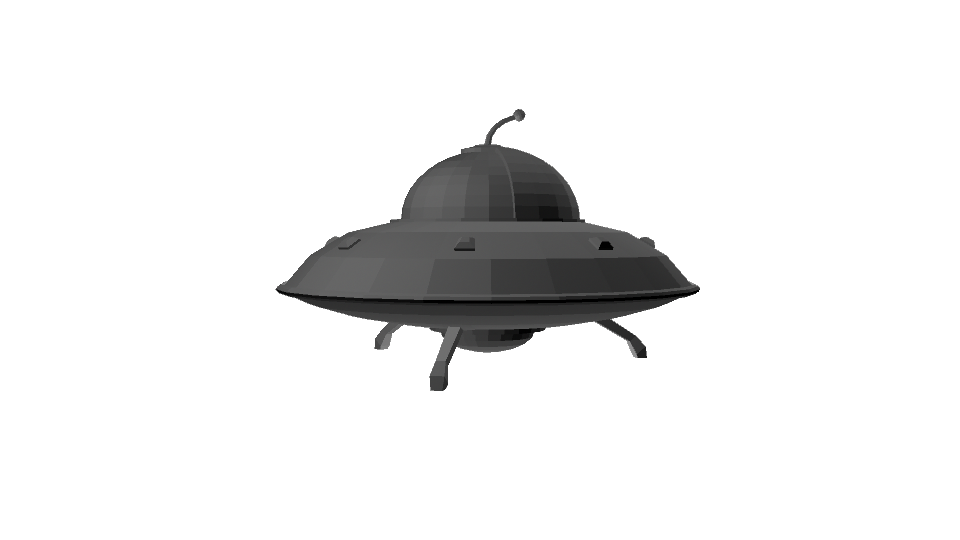
- I also provided feedback to other artists' work this week (such as Riley's UFO model) in order to improve clarity

Content Negative 
- I didn't get around to doing much this particular week due to circumstances out of my contol
- Meeting was hard for our team to accomplish this week, and when we did it felt rather rushed
- I really wish I was able to contribute more this week as I didn't do much
-Perforce is creating many problems for our entire team and slowing progress

Wednesday, October 28, 2015

Riley Stewart Wk 6 PPJ

UFO Modeling

My task for the week was to model the primary UFO object to be used by the player, and the control panel overlay that will be seen by the player. Using Angela's concept art, the ship was modeled in about four hours, followed by the control panel, which took about three hours. The UFO model itself is primarily used for shadows and reflections that might be seen by the player, as the game will be played in first person. The control panel will be a single png image that will be overlaid onto the players view. For next week, the control panel will be textured and modified as needed, along with the ship if necessary.


Total Time: 7 Hours

Pros:
- Primary models created

Cons:
-Perforce

Total Hours: 7

David Monteleone, Week 6 Journal PPJ, Blog post 3


GDD Draft Update, Status Report, Perforce, Unify Controls

Content with Hours (Examples included):
This week did not go exactly as planned. This was our first week of fully using Perforce. Thus, we had some issues.
I ran into a number of issues with Perforce that resulted in major setbacks. Some of my changes were completely lost and it took a good several hours just to learn and figure out how to manage a Unity game in Perforce. I figured out that you never want to submit the Library folder from Unity! You also need to setup Unity so that it allows Perforce to read your metafiles. These two small bugs took my several hours to figure out. I had to test that Perforce was working correctly with Xavier.
(2 hrs)

After Perforce finally worked, I decided to focus on polishing the games we currently had and integrate Slapz. Sadly, a last minute .ma file issue resulted in Slapz not being in our latest build. I went ahead and attempted to unify the controls so that all games play in a similar fashion on the Xbox 360 controller. This was difficult just due to the fact that many people scattered control scripts throughout the project. This useful script helped me figure out how to get the joysticks to act like buttons:
if (Input.GetAxisRaw("P1_Vertical") == -1){
fly.transform.Translate(Vector3.forward*MoveSpeed*Time.deltaTime);
}
 (5 hrs)

My final task for the week was to update the GDD. I went through and fleshed out the mini games now that we have a better understanding of how they’ll ultimately behave. I also had more art to add in! Thus, I updated the figures in the paper.
 (3 hrs)

Content Positive (Duplicate hours from above):
-          Perforce is now setup and in use(2 hrs)
-          The controls are almost unified, but moving in the right direction(5 hrs)
-          The GDD has fleshed out mini game content and more artwork(3 hrs)

Content Negative
-          Perforce has proved to be a difficult environment to work with, but hopefully it won’t be much of a problem anymore.

Total Hours for the week: 10 hrs


Tags: GDD Draft Update, Status Report, Perforce, Unify Controls, Slapz, PPJ

Wednesday, October 21, 2015

Cory Zicolella, Week 5 PPJ, Blog Post 2

Team Logo Concepts/Creation - (1.5 hrs)
Target Model - (2 hrs)
Sale Pitch - (1.5 hrs)
Perforce Functionality (1.5 hrs)

This week I decided that I'd handle some of the more miscellaneous things, making one of what will be many target models for the Mech Game and Creating a handful of ideas for our team logo.  I also tackled the Sell Pitch based off of our GDD and created a skeleton file that no doubt will go through several revisions before project completion.

The first matter of business for me was getting the Sale Pitch out of the way, so I tried to make the GDD as straight forward and exciting as I could with the current art we have and direction for the game.  There isn't much else to be said here.

Undoubtedly the most fun this week I've had was with designing some team logos:


I believe at this point, we've decided to go with the bottom-most design to represent our team, although whether it will be colored or not, or what those colors will be are not yet decided.  Of course, all designs are not final.

The model was the source of most of my frustration and because of it, I may not be able to get to another one I was planning on doing (at the time of writing).  For whatever reason Maya continuously crashed and dumped all my progress for quite awhile. I eventually worked around it but it really hindered my progress; it took far longer than it should have.

Content Positive:
  • I really enjoyed making the logos and the ideas that came out of it gave us a good selection (1.5 hrs)
  • The Sale Pitch was created relatively smoothly, mostly due to how nicely the GDD was completed (1.5 hrs)
  • The Target model is completed so the Mech game doesn't have to have floating circles now (2 hrs)
  • We made a team Slack and that makes communication even more easy.
Content Negative:
  • Perforce confused me so much, first because I couldn't find the right one to download, and then secondly because the UI was new to me.  Alas, I know how to do basic file management now. (1.5 hrs)
  • The Target Model repeatedly crashed on me and really ate into my team, especially during midterm week.
Total Hours for the week: 6.5

Edit:  I worked on a rough version of the Mech Legs for about another hour and a half.  It was against crashing, I may have to troubleshoot Maya. This brings the new total hours to 8 this week.