Showing posts with label Week 6. Show all posts

Wednesday, February 17, 2016

Vincent Slifer PPJ week 06

This week was fairly unproductive for me, in my eyes.  My focus was adding instructions for the games Popcorn Popper, Item Dodge, and Ram the Planet.  Along with the simple task, I also created a method to visually show how much time the players have to complete each game.  The only difficulties I had was implementing the timer so it could universally be used in all of the games.

Positive Content
  • Added Human and Alien Controls to the UI for Item Dodge, Popcorn Popper, & Ram the Planet
  • Created method to visually show the time in the games
Negative Content
  • Popcorn Popper & Item Dodge need more finalized art and textures

Work and Hours
Research (~2 hrs)
- Methods to move UI elements a set distance
- Method to easily set up the visual timer

UI + Aesthetics (~2 hrs)
- Added instructions for Popcorn Popper, Item Dodge, + Ram the Planet
- Added art to liven up games

Total Hours: 4 hrs

Angela Buchanan, Week 6 PPJ, Blog Post 6, GMAP 378

Interface, 2D art
After feedback from last class, I shifted my primary focus to the UFO interface. We needed a better way to get the alien instructions across more clearly and quickly. 

Since the humans have their screens split at the bottom, I decided to give the aliens their own designated screen centered at the top. I have minor concerns regarding the screen space taken up by the aliens screens, so it may have to be slimmed down. This will be a decision made during our next group meeting.  

Additionally, I spent some time getting all the instructions up to date as well as the slot machine icons.
Aside from 1 or 2 games, everything is up to date now.

Overall the week was productive, but not as productive as I had intended. A different class demanded more attention than this one and that assignment took more time than I had anticipated.

Positive Content   
- Aliens now have their own screen and set of instructions
- Game instructions are currently up to date
- All dash instructions are now designed to be 100% aligned.


Negative Content
- Didn't get everything planned done.
- Alien dash may take up too much screen space.

Work and hours

Alien Dash Update (2 hrs)

The top center of the screen seemed like a good place to store alien instructions, since the humans don't have to pay much attention to the top of their screen.

Since the alien instructions will always be in the same place, they will now quickly know what to do and how to do it. 

I also kept the design simple so that the humans would not be overly distracted.


Alien Instructions (4 hrs)

I had to set up the basic framework for the alien instructions (buttons/icons)
Now that one is in place, it should be very easy to update the instructions as needed.

Like the human instructions, they are designed to align perfectly when placed at the same spot on the screen.


Alien Model Texture (.5 hrs)

Originally, I was going to focus more on this. But I decided other tasks had a higher priority. 
However, I still spent some time making sure the UVs are going to work the way I want them to so that I can address any potential problems during our next group meeting.

Icon + Human Instructions Update (3 hrs)

I decided that aligning the human instructions was high priority task, so I completed that as soon as possible. 

Additionally, I added instructions for the games that needed them.

I also made sure that the slot machine had all the icons for all current games.


Total Hours: 9.5 hrs 

Monday, February 15, 2016

Tj Heiney, Week 6 Journal PPJ, Blog post 6, GMAP 378

Add art to Refueled and fix movement:
I updated the art for Refueled to fit the beta. This required me to tweak some of the scripts and placement of items. I also needed to fix the movement for refueled. A lot of the issues with Refueled were fixed when I switched over to using AddForce() for the movement. John and I had originally attempted to do this when I started creating Refueled but hit a strange bug. I did a lot of testing to see if the bug would reoccur but I could not replicate this in the most recent build. I did a lot of tweaking and moving things around in an attempt to make things better.

I still need to add the progress bar that Vince has implemented. I think Refueled is really close to being done and ready for gold build. On the art side, It needs some instructions tweaked, a model textured, and the positioning for the first person fuel nozzle needs to be changed.

The controls and movement are much improved but I think tweaks still need to be made. The play space is too large and makes catching the aliens a little hard.


(2 hours)
Add art to Shooting Gallery and fix movement:
Shooting Gallery uses the same movement as Refueled. The logic is the same so I needed to tweak and update Shooting Gallery as I updated and tweaked Refueled. I did not tighten up or try to tighten up the movement for Shooting Gallery. I left the controls very flighty. The game is short and I think the floaty nature feels better and more challenging. This may need to be tweaked based on feedback.
I also added the art which looks good. Some things may change in later builds because I scrounged up art from other places in the game. Seems good to me though. 
  
(2 hours) 

Positives
I got my games up to the Beta quality that we wanted.
Negatives
I was still pretty sick. 

Total Content Hours: 4 hours

Thursday, October 29, 2015

Cory Zicolella, Week 6 PPJ - Blog Post 3

Modeling Mech Legs v2 - 2 hrs
Sell Update - 1 hrs

Admittingly, I didn't do much this week due mainly to problems I ran into with the University itself, taking much of my time.  That being said, I got the mech legs reasonably more done (adding actual feet to the model) and updated the sell pitch so it has much less filler, and is less wordy/more to the point overall.
At some point soon I'll be updating our team logo ideas, doing some color sampling--I also realized I made a really silly spelling error on all drafts of the word for whatever reason, so that is going to be fixed too.

Content Positive
- Now the legs at least will cast a suitable shadow; depending on if they are seen or not they could still be textured and modeled, but for now this will definitely work. (2 hrs)
- The sell update went rather well and I am much happier with the shorter length (1 hrs)
- I also provided feedback to other artists' work this week (such as Riley's UFO model) in order to improve clarity

Content Negative 
- I didn't get around to doing much this particular week due to circumstances out of my contol
- Meeting was hard for our team to accomplish this week, and when we did it felt rather rushed
- I really wish I was able to contribute more this week as I didn't do much
-Perforce is creating many problems for our entire team and slowing progress

Angela Buchanan, Week 6 PPJ - Blog Post 3

Angela Buchanan, Week 6 Journal PPJ, Blog post 3

Concept art, Interface Design, Flowchart

This was a lighter week in comparison to previous weeks. For the most part, my tasks could be considered completed. I would've liked to go a bit more in-depth with the interface design, but what I have currently is sufficient and likely won't have to be revisited. This week it was hard for me to participate in a good, quality group meeting due to schedule, so there are some things I would like to go over more thoroughly with the team. I also took care of the Status Report this week, since I knew I would be making a later post.

Positive Content

- The interface design is available to the team now, which helps convey the game more.
- I made icons for the flow chart to make it more exciting and easy to understand visually.
- The icons used in the flowchart are cute and work as nice decoration for other things.

Negative Content
- Meeting was difficult for our team this week due to do schedules.
- I wanted to be more in depth with the interface design, but I spent too much time focusing on other projects.
- I felt my production was a bit low this week.

Work and hours

·         Flowchart – 2 hrs
  • I made a more exciting visual representation of our game’s flow. It didn’t take too long, for I stuck to simple representations for the chart.


·         Interface Design - 5 hrs
  • I worked on making concept art of how the menu interface would look when choosing a game. I also designed how the score and time would look during the mini-games. I made multiple versions of each (with fairly minor differences), but I’m only going to post my personal favorites.


·         Status Report & Sell touch up – 30 min
  • I did the status report this week since I knew I would be making a later update. I also did some minor editing to the sell.

Total weekly hours: 7.5 hrs

Wednesday, October 28, 2015

Vincent Slifer Week 6 PPJ

This week was spent solely on troubleshooting conflicting and "missing" assets with the build on perforce.  Using perforce this week was a major hassle.  Assets would become unlinked at times, and old files created conflicting files that "delinked" with assets in the scene.  Beyond the problems with figuring out perforce, the actual project itself was somewhat simple this week.  I scripted simple methods to have a timer for mini-games, automatically display that time, and troubleshot issues that came up from integrating the mech game on perforce.

Positive Content
  • Integrated Mech Game into the main game
  • Built timer
  • Added placeholder music
Negative Content
  • Spent too much time on perforce
  • Relinked asset files
  • Troubleshot Mech Game files on perforce
Work and Hours
Perforce Troubleshooting (2 hrs)
  • Relinked files
  • Deleted conflicting files
Programming (2 hrs)
  • Relinked files
  • Fixed conflicting files
  • Built timer code
  • Created Unity package solely for asset integration
  • Fixed minor problems
Total Work Time: 4 hrs

Riley Stewart Wk 6 PPJ

UFO Modeling

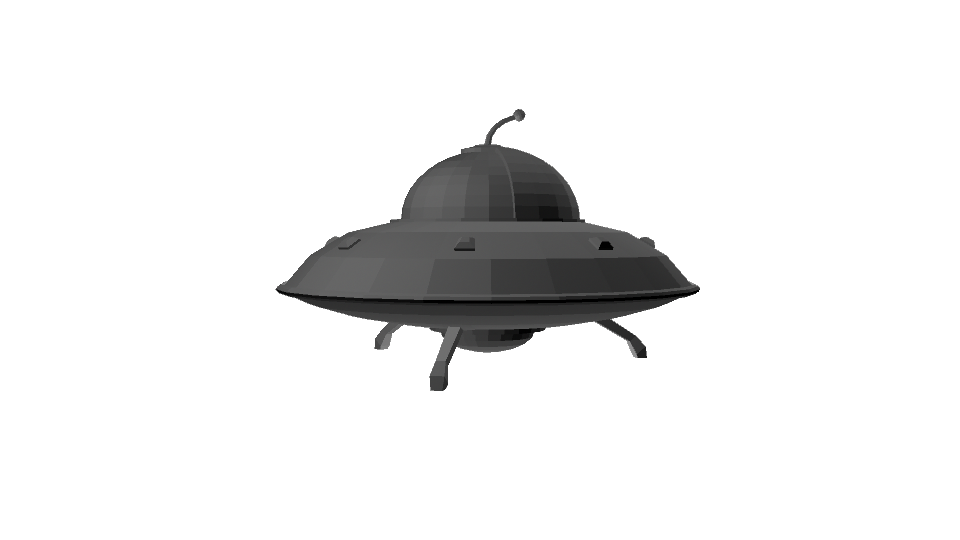
My task for the week was to model the primary UFO object to be used by the player, and the control panel overlay that will be seen by the player. Using Angela's concept art, the ship was modeled in about four hours, followed by the control panel, which took about three hours. The UFO model itself is primarily used for shadows and reflections that might be seen by the player, as the game will be played in first person. The control panel will be a single png image that will be overlaid onto the players view. For next week, the control panel will be textured and modified as needed, along with the ship if necessary.


Total Time: 7 Hours

Pros:
- Primary models created

Cons:
-Perforce

Total Hours: 7